|
Liberty Virtual Courtroom for Hybrid and Virtual Courts |
|
|
Liberty Virtual Courtroom for Hybrid and Virtual Courts |
|
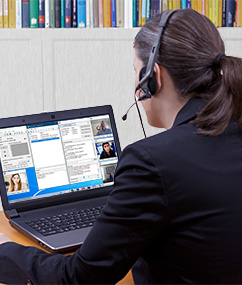
Purpose-Built for Courtroom Proceedings This design was driven first and foremost by the needs of the court clerk or reporter-the person traditionally responsible for running the room, managing the recorder, coordinating remote appearances, handling phones, and ensuring the official record is created correctly. Whether that responsibility is shared across multiple roles or handled by a single individual, Liberty Virtual Courtroom was engineered to dramatically simplify that workload. A Unified Workflow for In-Room, Hybrid, and Remote Hearings Liberty Virtual Courtroom includes the core conferencing functions courts expect-such as private rooms, role-based permissions, participant muting, controlled screen sharing, and moderated entry-without introducing consumer-oriented features that are inappropriate for judicial proceedings. There are no social elements, visual effects, or distractions; all controls are designed to support order, clarity, and judicial authority. This ensures familiarity for users while maintaining a courtroom-appropriate environment. Further, all invitation links and waiting areas are customized with court-specific messaging and branding to provide clear instructions and reinforce official court presence for remote participants. Participants can be moved dynamically between lobbies, galleries, and active courtrooms without disconnecting or rejoining sessions. This eliminates the need to log out and log back in to switch rooms, reduces rescheduling caused by technical issues, and minimizes confusion when participants arrive in the wrong location. If a physical courtroom becomes unavailable due to equipment issues or scheduling conflicts, court staff can immediately move participants to another available courtroom without interrupting remotely connected parties. This flexibility supports higher continuation rates and smoother docket flow-capabilities that meeting-centric platforms do not provide. Designed to Scale with the Needs of the Court Liberty Virtual Courtroom has been developed and refined to support a wide range of court operating models, from high-volume calendars managing hundreds of connected participants in a single day-such as traffic or arraignment courts-to courts that host only occasional remote appearances. The same platform and workflow apply regardless of court size or volume. In addition to managed participant access, Liberty Virtual Courtroom optionally supports live streaming of proceedings for public viewing. This allows courts to provide public access without admitting people into the virtual courtroom who will not actively participate. Public viewers observe through a controlled broadcast stream, preserving courtroom decorum while reducing the administrative burden of managing large numbers of passive attendees. Integrated Within the Liberty Recording Ecosystem Importantly, the Liberty Virtual Courtroom integrates directly with Liberty Court Recorder, allowing every participant-both in-room and remote-to be captured on isolated audio and video channels. This recorder-centric architecture fundamentally differs from meeting-based platforms, which typically mix multiple participants into shared audio tracks or generate separate cloud recordings that must later be retrieved and reconciled. With Liberty, all of the media associated with a proceeding-including participant audio and video, bookmarks, annotations, transcripts, attendance, and attached files-is written into a single authoritative recording file at the time of capture. There is no need to manage multiple applications, reconcile in-room recordings with cloud recordings, or merge files after the fact. Because Liberty Virtual Courtroom is recorder-centric rather than meeting-centric, it also delivers substantial benefits to IT and AV teams. The platform eliminates the need for specialized conferencing licenses such as Zoom Rooms or Teams Rooms to integrate courtroom hardware. Existing microphones, cameras, and AV systems connect directly to the recorder without external AV bridges, hardware codecs, or third-party capture software. Built-in SIP/VoIP phone support removes the complexity of audio bridging for dial-in participants, while simplifying video routing, evidence presentation, and remote participant display. From an IT perspective, this means fewer applications and hardware to secure, update, and support-and a more predictable, court-controlled system architecture. These architectural choices also benefit transcription workflows, an often-overlooked group impacted by virtual court technology. Because each participant is recorded on an isolated channel, both human transcriptionists and AI-based transcription systems can work with cleaner audio, clearer speaker attribution, and precise timestamp alignment. Transcription, review, and playback all operate against the same unified file, improving accuracy, reducing turnaround time, and lowering overall cost. Built Through Real-World Court Collaboration Most importantly, Liberty Virtual Courtroom preserves the integrity of the court record. Recordings are created locally under court control, not fragmented across external cloud services. Playback, transcription, review, and export all operate against the same authoritative file, ensuring consistency, auditability, and long-term accessibility regardless of whether a proceeding is in-person, hybrid, or fully remote. Liberty Virtual Courtroom replaces the patchwork of meeting software, AV bridges, phone systems, and separate recording tools with a single, court-designed platform. By simplifying the job of running the courtroom, it delivers cascading benefits to clerks, reporters, IT staff, AV teams, transcriptionists, and ultimately the public-providing a consistent, defensible workflow for modern court proceedings. Instead of placing the focus on a grid of video portraits, the Liberty Virtual Courtroom empowers court staff with a unique set of controls in a Conference Manager Window used for managing and controlling hybrid and virtual court sessions. In the Conference Manager Window, at a glance, court staff can quickly determine the status and roles of all conference participants. The screen capture below illustrates the Conference Manager Window where details about all of the participants are made available to court staff. Information such as the participant name, time of appearence, docket number and the role they play in the case are all immediately available.

Introductory Video Watch the 90 second video linked below for an introduction to the Liberty Virtual Courtroom.
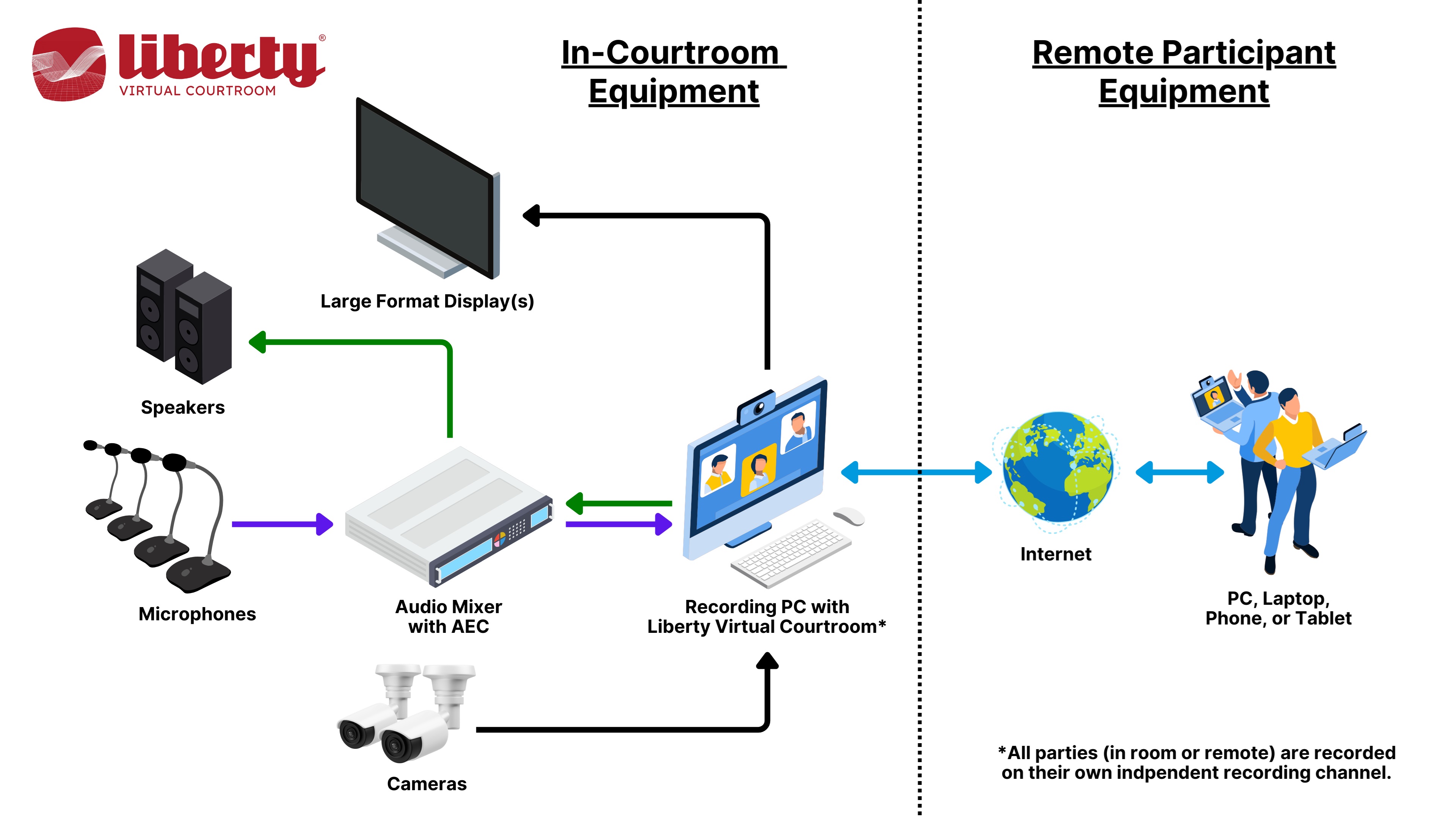
Liberty Virtual / Hybrid Court Diagram
Liberty Virtual / Hybrid Courtroom Features Include:
Contact Liberty Recording for more Information
More details on the Liberty Recorder program can be obtained by
contacting Liberty Recording at |
|
Copyright High Criteria Inc. 2005-2026. All Rights Reserved. |